
Translate English to Tamil Audio: Spoken Voice & Speech Guide
Tamil is spoken by more than 85 million people worldwide. From international business meetings and academic lectures to customer calls and video notes, learning how to translate english to tamil audio accurately makes communication immediate, natural, and accessible.
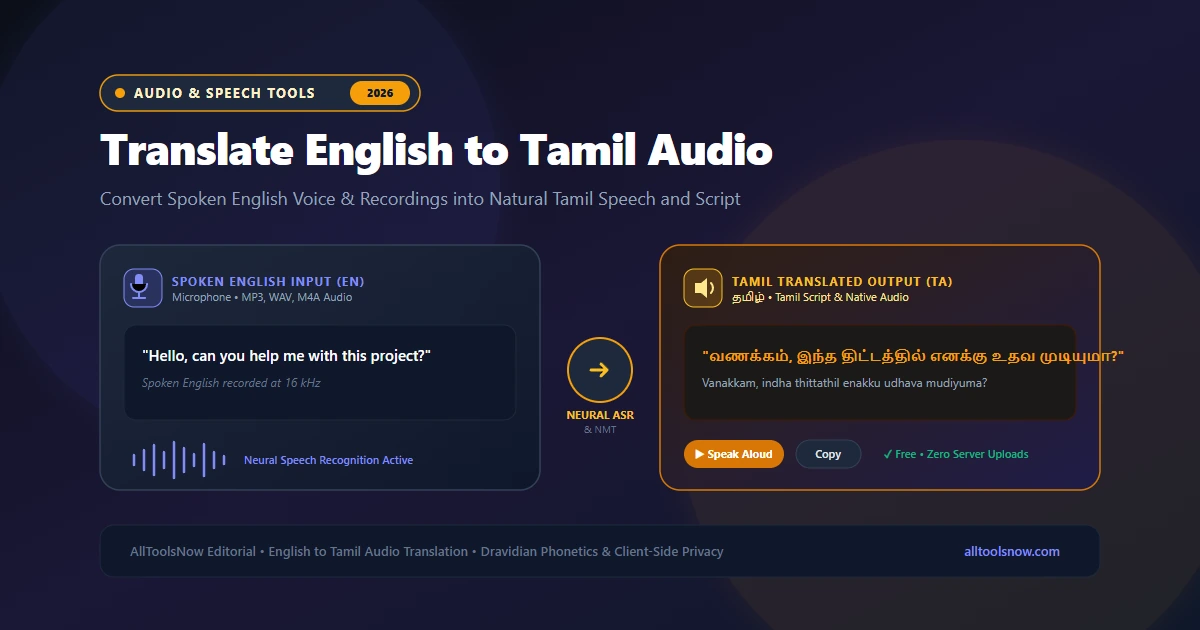
Translate English Speech & Audio Recordings to Tamil
Speak English into your microphone, upload audio voice files (MP3, WAV, M4A), generate Tamil script, and listen to synthesized Tamil speech with complete client-side privacy.
Tamil is one of the world's oldest living classical languages, spoken by more than 85 million people across Tamil Nadu, Sri Lanka, Singapore, Malaysia, and worldwide diaspora communities. As global business, digital education, and remote collaboration expand, professionals and students frequently need to convert English meetings, university lectures, customer service calls, and voice notes into Tamil. Learning how to translate english to tamil audio accurately makes cross-language communication fast and reliable.
Instead of writing down English speech, searching for vocabulary in bilingual dictionaries, and struggling with complex Dravidian verb conjugations, modern voice technology automates the entire process. Spoken English audio is captured through a microphone or sound file, transcribed using neural acoustic models, restructured into natural Tamil grammar, and pronounced aloud through speech synthesis. The same tools also support the reverse workflow to convert Tamil spoken audio back into clear English.
This guide explores the speech recognition technology behind English to Tamil translation, examines the structural and phonetic differences between Germanic and Dravidian languages, outlines practical steps for translating audio files, and reviews best practices for clear, natural results.
How English to Tamil Speech Translation Operates
Converting spoken English audio into Tamil involves three distinct computational systems operating in sequence: automatic speech recognition (ASR), neural machine translation (NMT), and text-to-speech synthesis (TTS).
The process begins when an audio signal enters the system. Your microphone or uploaded sound file is sampled at 16,000 samples per second. An acoustic model converts the continuous sound waves into a mel-spectrogram, which visualizes audio frequencies according to human pitch perception. The model analyzes these spectral patterns in 25-millisecond windows to identify phonemes, which are the basic phonetic units of spoken English. A language model then matches those phonemes against vocabulary lists and grammatical structures to generate written English text.
Once the English transcript is established, the neural machine translation engine evaluates the sentences. Early statistical translation engines substituted individual words, creating broken, robotic Tamil that sounded unnatural to native speakers. Modern neural systems use deep transformer models that process entire sentences simultaneously. The transformer model identifies sentence context, resolves pronouns, converts the English Subject-Verb-Object (SVO) order into Tamil Subject-Object-Verb (SOV) order, and selects appropriate honorific verb endings before producing natural Tamil script.
Finally, if you want spoken audio output, a speech synthesizer uses natural human voice profiles to read the translated Tamil text aloud through your speakers, capturing authentic regional rhythm, vowel lengths, and intonation.
Linguistic Differences Between English and Tamil
English belongs to the Indo-European language family, while Tamil is the oldest member of the Dravidian language family. Their grammatical architecture, phonetic inventory, and sentence rhythms differ substantially. Understanding these linguistic factors helps explain why basic automated translators often produce awkward phrasing and how advanced neural engines address them.
Subject-Verb-Object (SVO) vs. Subject-Object-Verb (SOV)
English follows a standard Subject-Verb-Object word order:
- "The teacher (Subject) explained (Verb) the lesson (Object)."
Tamil predominantly uses a Subject-Object-Verb word order:
- "ஆசிரியர் (Subject) பாடத்தை (Object) விளக்கினார் (Verb)." (Aasiriyar paadathai vilakkinaar.)
When translating spoken English into Tamil audio, a translation engine cannot translate words sequentially. It must wait until the full English predicate is analyzed before placing the verb at the very end of the Tamil sentence. In complex sentences with multiple clauses, this grammatical reordering requires deep contextual memory.
Agglutinative Morphology and Verb Conjugation
Tamil is an agglutinative language. Words are built by attaching multiple grammatical suffixes to a single root word. A single Tamil verb encodes tense (past, present, or future), person (first, second, or third), number (singular or plural), and social honorific level.
Consider how the English verb "to come" translates into Tamil based on the subject:
- "I come" translates to "நான் வருகிறேன்" (Naan varugiren).
- "We come" translates to "நாங்கள் வருகிறோம்" (Naangal varugirom).
- "He comes" (informal) translates to "அவன் வருகிறான்" (Avan varugiraan).
- "He comes" (respectful/formal) translates to "அவர் வருகிறார்" (Avar varugaar).
- "They come" translates to "அவர்கள் வருகிறார்கள்" (Avargal varugiraargal).
In spoken English, the verb "come" changes very little across subjects. When an audio translation tool converts English speech into Tamil, the neural model must identify the subject of the English sentence and apply the correct gender, plurality, and politeness markers to the Tamil verb ending.
Diglossia: Literary Senthamizh vs. Spoken Kodunthamizh
Tamil exhibits a pronounced linguistic feature known as diglossia. There is a sharp distinction between formal literary Tamil (Senthamizh / செந்தமிழ்) and informal spoken Tamil (Kodunthamizh / கொடுந்தமிழ்).
Formal Tamil is used in news broadcasts, literature, official political speeches, and academic textbooks. Spoken Tamil is used in everyday phone calls, casual conversations, movies, and family voice notes. In spoken Tamil, verb endings and pronouns are frequently shortened:
- Formal: "நான் வீட்டிற்குப் போகிறேன்" (Naan veettirkup pogiren - I am going home).
- Spoken: "நான் வீட்டுக்கு போறேன்" (Naan veettukku poren).
High-quality voice translators strike a balanced middle ground: they produce grammatically standard Tamil that remains polite, clear, and easy to understand across both formal and conversational contexts.
Retroflex Consonants and Phonetic Precision
Tamil has a rich system of retroflex consonants, produced by curling the tip of the tongue backward toward the hard palate:
- The retroflex approximant "ழ்" (/ɻ/), found in words like "தமிழ்" (Tamil) and "வாழ்க" (Vaazhga).
- The retroflex lateral "ள்" (/ɭ/), distinct from the alveolar lateral "ல்" (/l/).
- The retroflex nasal "ண்" (/ɳ/), distinct from the alveolar nasal "ன்" (/n/).
- The retroflex stop "ட்" (/ʈ/), distinct from the dental stop "த்" (/t̪/).
English speakers often pronounce all "l" and "n" sounds identically. When translating from Tamil audio to English, the speech engine must distinguish these delicate retroflex frequencies. When translating from English to Tamil audio, the speech synthesis engine must articulate these retroflex sounds accurately so the Tamil speech sounds natural to native ears.
Code-Mixing and "Tanglish"
In urban centers like Chennai, Coimbatore, and Madurai, conversational Tamil regularly incorporates English words, a pattern commonly called "Tanglish." Speakers combine English nouns and verbs with Tamil grammatical markers:
- "Enakku andha document-ai send pannunga" (Please send that document to me).
- "Naan innum update parkala" (I have not seen the update yet).
Modern speech recognition and translation tools are trained on code-mixed audio corpora. When processing mixed speech, the system recognizes both the English loanwords and the surrounding Tamil grammar without crashing or hallucinating.
Primary Methods to Translate English Audio to Tamil
Users have several practical technical approaches when translating spoken English into Tamil. Each method offers distinct advantages depending on whether you need quick travel phrases, live microphone translation, or private processing of recorded voice files.
Browser-Based English to Tamil Audio Translators
Browser-based tools allow you to transcribe and translate spoken audio directly in your web browser without downloading software or registering an account.
Using client-side audio decoding through the Web Audio API, relying on a dedicated english to tamil audio translator like the AllToolsNow Voice Translator decodes audio files and microphone input inside your browser memory. This approach provides a significant privacy advantage: sensitive business discussions, client voice notes, and private recordings are not retained on remote cloud databases or used to build commercial datasets.
Mobile Translation Apps
Mobile applications from Google Translate and Microsoft Translator offer split-screen conversation modes on smartphones. One user speaks English, and the app reads the Tamil translation aloud through the phone speaker.
While convenient for tourism and brief in-person exchanges, mobile apps rarely support uploading pre-recorded MP3 or WAV audio files from external voice recorders, podcasts, or lecture captures.
Desktop Speech Recognition Software
Power users and professional transcriptionists often combine desktop tools like Whisper Desktop with local neural translation libraries.
Desktop setups handle very long audio recordings and function completely offline. However, they require powerful hardware with dedicated graphics processors (GPUs), large storage capacity for model weights, and technical familiarity with command-line tools.
Comparison of English to Tamil Audio Translation Options
| Feature | Browser Voice Translator | Mobile Apps | Desktop Local Software | Hardware Devices |
|---|---|---|---|---|
| Cost | 100% Free | Free with ads / tracking | Free (Open source) | $150 to $350 |
| Audio File Uploads | Supported (MP3, WAV, M4A) | Live microphone only | Supported (via FFmpeg) | Live microphone only |
| Privacy Protection | High (Client-side memory) | Medium (Cloud telemetry) | Complete (Offline local disk) | Medium (Vendor cloud) |
| Hardware Demands | Any modern web browser | Smartphone | Dedicated GPU / VRAM | Dedicated standalone device |
Step-by-Step: How to Translate English to Tamil Audio
Translating an English audio recording or live voice into Tamil using an online voice translator is straightforward. Follow these four practical steps:
Step 1: Prepare and Inspect Your Audio Input
If you are speaking live into a microphone, select a quiet room with minimal background noise. Position your microphone 4 to 6 inches from your mouth to avoid plosive breath pops while maintaining a strong audio signal.
If you have a pre-recorded English audio file from an interview, Zoom call, or voice memo, verify the file format. Common formats like MP3, WAV, AAC, and M4A are supported directly. If your recording is saved in an uncommon container, convert it first with an online Audio Converter. If the file contains long silences or unwanted banter, use an Audio Trimmer to focus on the essential speech.
Step 2: Configure Your Translation Languages
Open the voice translation tool in your web browser. Select English as your source input language and Tamil as your target output language. If you need the reverse workflow, you can easily switch languages to translate spoken Tamil audio into English text and speech.
Step 3: Record Live Speech or Upload Your Audio File
Click the microphone button and speak clearly in English, or drag and drop your recorded audio file into the upload zone. The system analyzes the incoming sound waves, runs acoustic feature extraction, and generates the English transcript in the left text editor.
Step 4: Review and Generate Tamil Translation
Take a moment to check the generated English transcript. If a technical term, company name, or numerical figure was slightly misheard, correct it directly with your keyboard.
The neural machine translation engine immediately updates the right window with fluent Tamil script. Click the Speak button to hear the Tamil translation read aloud using native speech synthesis, or click Copy to paste the Tamil text into your document or messaging app.
Best Practices for Accurate English to Tamil Audio Translation
To get the highest possible translation quality when processing spoken English into Tamil, keep these recommendations in mind:
Speak in Complete Sentences
Because Tamil uses Subject-Object-Verb word order, the translation engine needs the full context of an English sentence before it can generate the correct Tamil verb ending. Speaking in complete thoughts rather than isolated phrases ensures that the translation model selects the proper verb tense and honorific agreement.
Maintain a Consistent Speaking Tempo
While modern acoustic models accommodate natural conversational cadence, speaking at an excessively rapid pace without pauses between clauses increases word error rates. Speaking at a steady tempo of 120 to 150 words per minute allows the speech recognition model to accurately detect consonant transitions.
Use a Directional Microphone in Shared Spaces
Ambient noise from air conditioners, road traffic, or open offices lowers the signal-to-noise ratio of your recording. Using a directional headset microphone isolates your voice and filters out room reverberation, dramatically improving speech recognition accuracy.
Verify Proper Nouns and Numerical Values
While neural translation engines handle everyday grammar and idioms with high accuracy, phonetic spellings of rare proper names, medical dosages, and financial figures should always be double-checked before sending translated files to clients or colleagues.
Frequently Asked Questions
How can I translate english to tamil audio online for free?
You can translate English audio into Tamil for free using browser-based tools like the AllToolsNow Voice Translator. The system allows you to speak into your microphone or upload audio files in MP3, WAV, or M4A format, generates complete Tamil script, and provides native spoken audio playback without requiring software installation or account sign-ups.
How does the system handle English technical terms that lack Tamil equivalents?
Modern neural translation models handle technical, computing, and scientific terms through smart contextual transliteration. Common terms like software, internet, file, and database are rendered in Tamil phonetics so that the translated text remains clear and natural to contemporary Tamil speakers.
Can I translate Tamil voice recordings back into English?
Yes. The speech translation system is fully bidirectional. By choosing Tamil as your source language and English as your target, you can speak in Tamil or upload recorded Tamil audio files to generate accurate English text and synthesized English audio playback.
Are my audio recordings stored or shared on external cloud servers?
When you use the AllToolsNow Voice Translator, audio decoding and transcription operate inside your local web browser session using the Web Audio API. Your microphone input and uploaded audio files are not stored on remote company servers or used to build commercial machine learning datasets, ensuring full privacy.
What should I do if an unusual family name or brand name is misspelled?
If a rare proper noun or brand name is misinterpreted by the speech recognition engine, simply click into the English transcript box, edit the spelling with your keyboard, and click Re-Translate. The system will update the Tamil translation instantly without requiring you to re-record your audio.
Explore Voice Translation Guides
- Translate Inggris Indonesia Voice to English: Spoken Audio Guide
- How to Translate Audio: Speech to Text and Voice Workflows
- Spanish to English Voice Translator: Convert Spoken Spanish to Fluent English
- Hindi to English Voice Translation: How Speech Recognition Bridges Languages
- English to Hindi Voice Translator: Speak English & Translate to Hindi
- Online Voice Translator Tool: Speak & Translate Across 50+ Languages