
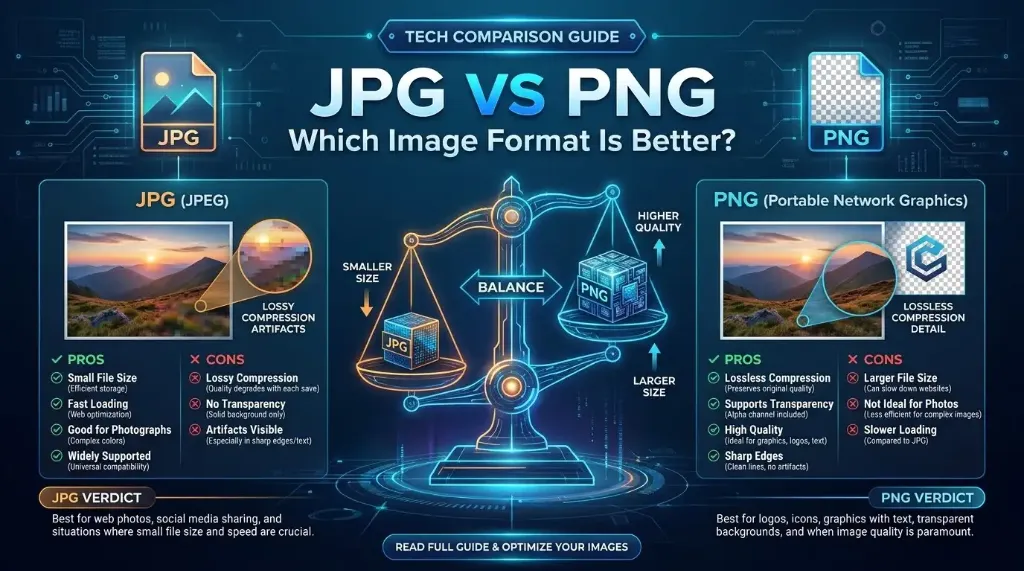
1. Understanding the Contenders: How JPG and PNG Work
When comparing jpg vs png, it is helpful to look at the origins and core engineering principles behind each format.
What Is JPG (JPEG)?
Created in 1992 by the Joint Photographic Experts Group, JPG (or JPEG) was designed to solve a critical problem: high-resolution photographic images were far too large for early digital storage and bandwidth. JPG solves this by applying sophisticated perceptual compression that discards subtle color transitions the human eye struggles to see, achieving massive file size reductions.
What Is PNG?
Created in 1996 as an open-source, patent-free replacement for the aging GIF format, PNG (Portable Network Graphics) was built specifically for computer graphics and the World Wide Web. PNG focuses on absolute preservation of visual data, providing lossless compression and an 8-bit alpha channel that supports variable levels of transparency.
2. Lossy vs. Lossless Compression: The Technical Battle
The most fundamental difference in the jpeg vs png comparison is how each format handles data compression.
How JPG Compresses Data (Lossy DCT)
JPG uses lossy compression based on the Discrete Cosine Transform (DCT). It breaks an image into 8×8 pixel blocks and converts spatial pixels into frequency values. Because human vision is far more sensitive to brightness (luminance) than to fine color hue differences (chrominance), JPG discards high-frequency chrominance data that humans cannot readily detect.
However, this mechanism has a downside: along high-contrast boundaries—such as black text on a white page or straight geometric borders—JPG produces noticeable "ringing" artifacts and blurriness around sharp edges.
How PNG Compresses Data (Lossless DEFLATE)
PNG uses lossless compression combining row prediction filtering with the DEFLATE algorithm (the same algorithm used in ZIP archives). PNG searches for recurring patterns across horizontal rows and replaces repeated byte sequences with short binary references.
Not a single pixel is ever discarded. When you decompress a PNG, the rendered image is a 100% bit-for-bit recreation of the original source.
3. Alpha Transparency: The Exclusive Superpower of PNG
If your visual design requires transparency, the jpg vs png debate is immediately settled: JPG cannot do transparency.
JPG is strictly a 24-bit RGB format. Every pixel must have a definitive red, green, and blue value. If you save an isolated logo or product cutout as a JPG, the transparent areas must be filled with a solid color (typically white or black).
PNG supports a 32-bit RGBA color model, featuring an independent 8-bit Alpha channel. This allows for 256 gradations of opacity per pixel (from completely see-through to completely opaque). This enables soft drop shadows, glowing effects, and smooth antialiased edges that blend naturally over any website background color or dark mode theme.
Pro Tip: Need to strip transparency from a PNG to speed up website load times? Use our PNG to JPG converter, which automatically blends alpha channels onto a crisp, solid white background before compression to prevent unsightly black box artifacts.
4. Real-World File Size & Quality Benchmarks
To observe how jpg vs png impacts file size in practical scenarios, examine these real-world benchmarks across three distinct image types:
| Test Image Type | PNG File Size | JPG File Size (90% Quality) | Size Difference |
|---|---|---|---|
| High-Res Landscape Photo (4000×3000) | 14.2 MB | 1.8 MB | JPG is 87% smaller |
| Software UI Screenshot (1920×1080) | 320 KB | 480 KB | PNG is 33% smaller (and sharper) |
| Corporate Vector Logo (800×800) | 42 KB | 95 KB | PNG is 56% smaller (with alpha) |
As the benchmark shows, photographs with continuous color gradients compress dramatically better in JPG. Conversely, computer screenshots and logos with flat color areas compress far more efficiently in PNG while avoiding unsightly compression halos around text.
5. Head-to-Head Comparison Table
Here is a complete side-by-side feature breakdown comparing jpeg vs png across every major technical metric:
| Feature | JPG / JPEG | PNG |
|---|---|---|
| Compression Type | Lossy (DCT + Chroma Subsampling) | Lossless (DEFLATE / LZ77) |
| Color Depth | 24-bit RGB (16.7 million colors) | Up to 48-bit TrueColor + 16-bit Alpha |
| Transparency Support | No (Opaque only) | Yes (8-bit alpha channel) |
| Re-saving & Editing | Generational degradation with each save | Zero quality loss upon repeated saves |
| File Size (Photographs) | Very Small (Lightweight) | Very Large (Heavyweight) |
| Text & Line Art Sharpness | Prone to blurriness and edge noise | Pin-sharp with 100% pixel fidelity |
| Browser Compatibility | 100% universal across all browsers | 100% universal across all browsers |
6. When to Use JPG vs PNG: Practical Scenarios
To ensure optimal website speed and visual appeal, follow these clear rules of thumb:
When You Should Definitely Use JPG:
- Website Hero Banners: Large photographic headers spanning the top of your site need to load immediately to preserve fast Largest Contentful Paint (LCP) scores.
- Ecommerce Catalog Pages: Online stores displaying dozens of product photos per page must keep payload sizes minimal to retain mobile shoppers.
- Digital Photography Portfolios: Photo galleries contain natural lighting gradients that look gorgeous in JPG while consuming a fraction of the bandwidth.
When You Should Definitely Use PNG:
- Logos & Brand Marks: Any logo that must float cleanly over dark navigation bars, colored footers, or photographic headers requires PNG transparency.
- Software Tutorials & Screenshots: UI walk-throughs featuring dialogue boxes, code snippets, and sharp application borders look crisp only in PNG.
- Technical Diagrams & Blueprints: Architectural schematics with fine hairline dimensions and numerical annotations demand lossless pixel accuracy.
Need to Convert Between JPG and PNG?
Convert your images in both directions instantaneously with 100% private browser-based processing.
7. Frequently Asked Questions
What is the main difference in JPG vs PNG?
The primary difference lies in their compression algorithms and transparency support. JPG uses lossy compression (DCT) that permanently discards imperceptible photographic data to create tiny file sizes, but cannot store transparency. PNG uses lossless compression (DEFLATE) that retains every single pixel bit-for-bit and supports an 8-bit alpha transparency channel.
Is JPEG the exact same thing as JPG?
Yes, JPG and JPEG are completely identical file formats. The .jpg file extension originated because legacy MS-DOS and early Windows FAT16 file systems required strict 3-character extensions, shortening .jpeg to .jpg. Modern operating systems treat .jpg and .jpeg identically.
Why are PNG files so much larger than JPG files for photos?
Photographs contain continuous color blends, micro-textures, and optical noise across millions of pixels. Because PNG is a lossless format, it must encode every single subtle shade variation without discarding information. JPG applies Discrete Cosine Transforms and color subsampling to approximate these smooth transitions, reducing file size by 70% to 85%.
Does converting a JPG to PNG improve its image quality?
No. Converting a JPG to PNG will not restore the visual data or fine details that were discarded during JPEG lossy compression. It merely prevents further generational degradation if you plan to edit, crop, or overlay graphics repeatedly.
Why does a transparent PNG turn black when saved as JPG?
JPG is strictly a 24-bit RGB format with no alpha transparency channel. When an image converter strips the alpha channel without filling the background, transparent pixels default to RGB(0,0,0) (black). Our in-browser PNG to JPG converter automatically composites transparent pixels onto a pure white canvas before compression to prevent black borders.
Which format is better for website SEO and Core Web Vitals?
For website performance and search rankings, JPG is generally superior for large hero images, blog banners, and photographic catalogs because its lightweight byte size drastically improves Largest Contentful Paint (LCP) and mobile page speed. PNG is best reserved for logos, navigation icons, and graphics requiring transparent backgrounds.